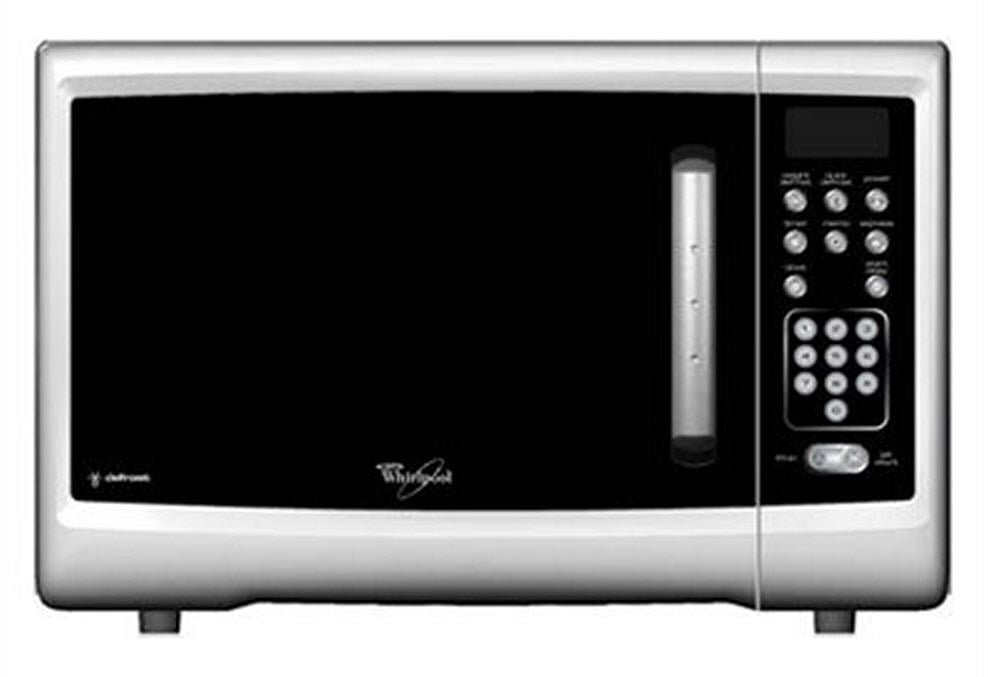
Welcome to TheKitchenApplianceDad.com, where we bring the most comprehensive insights into the kitchen appliances that make your life easier and your meals tastier. Today, we will delve into the world of convenient cooking with the Whirlpool Magicook 20C Microwave Oven. This quick user guide will help you get familiar with your new appliance, ensuring you can make the most of its features from the get-go.
Introduction to Whirlpool Magicook 20C
The Whirlpool Magicook 20C is a versatile and user-friendly microwave oven designed to cater to the needs of modern kitchens. It’s a gadget that combines efficiency with simplicity, allowing both seasoned chefs and kitchen novices to whip up delicious meals in no time. Before we dive into the specifics, let’s first understand why the Magicook 20C could be a valuable addition to your kitchen arsenal.
Key Features:
- Capacity: With a 20-liter capacity, it’s well-suited for small to medium-sized families.
- Power Levels: Multiple power levels give you the control to cook as per your needs.
- Pre-Programmed Menus: Pre-set menus for various Indian recipes make it a cinch to prepare your favorite dishes.
- Defrost Function: Thaw your frozen food quickly and evenly.
- Timer: Keep track of your cooking with the digital timer display.

Setting Up Your Whirlpool Magicook 20C
Before you start using your Whirlpool Magicook 20C, ensure it is installed properly. Here’s what you need to do:
Installation:
- Placement: Place the microwave on a flat, stable surface. Ensure there’s enough space around the unit for ventilation—leave at least 3 inches of space on the sides and 12 inches of space on top.
- Power Source: Connect your microwave to a properly grounded electrical outlet. Avoid using extension cords or power strips, as they can cause power fluctuations that may harm the appliance.
- Remove Packaging: Take out all the packing materials from inside the microwave, including any protective film on the control panel.
First Use:
- Initial Test Run: Conduct an initial test run with a cup of water for about a minute to ensure everything is working correctly.
- Cleaning: Wipe the interior and the exterior with a damp cloth to clean any residue from the manufacturing process.
Understanding the Control Panel
The control panel of the Whirlpool Magicook 20C is your gateway to its functions. Here’s a brief overview:
Control Panel Features:
- Power Level: Adjust the microwave power according to the type of food or recipe.
- Start: Begin the cooking process or add extra time to an ongoing session.
- Stop: Pause or stop the cooking process, or clear any current settings.
- Timer/Weight Adjustment: Set the cooking time or adjust the weight for defrosting.
- Pre-Programmed Menus: Access a range of pre-set cooking programs for various dishes.
Getting Started with Cooking
To start cooking with your Magicook 20C:
- Open the Door: Use the handle to open the microwave door and place your dish on the turntable.
- Select the Power Level: Choose the appropriate power level for your dish.
- Set the Time: Enter the cooking time using the timer/weight adjustment buttons.
- Start Cooking: Press the Start button to begin the cooking process.
Cooking with Pre-Programmed Menus
One of the standout features of the Whirlpool Magicook 20C is its array of pre-programmed menus tailored to Indian cooking. These menus are designed to take the guesswork out of cooking popular dishes.
How to Use Pre-Programmed Menus:
- Select the Menu: Press the menu button until you reach the desired pre-programmed setting.
- Enter Quantity: Some menus may require you to enter the quantity of food.
- Start: Press the Start button, and the microwave will adjust the cooking time and power level automatically.
Defrosting Made Easy
Defrosting food is a breeze with the Whirlpool Magicook 20C. The defrost function ensures that your food thaws evenly and quickly, without any partially cooked edges.
Steps to Defrost:
- Select the Defrost Function: Choose the defrost setting by pressing the defrost button.
- Enter the Weight: Input the weight of the food you are defrosting.
- Start Defrosting: Press the Start button to initiate the defrost cycle.
Maintenance and Cleaning
Keep your Whirlpool Magicook 20C in top condition by following a regular maintenance and cleaning routine.
Cleaning Tips:
- Interior: Wipe the inside with a damp cloth. For stubborn stains, use a mild detergent.
- Exterior: Clean the outside with a# Whirlpool Magicook 20C Microwave Oven Quick User Guide
Welcome to TheKitchenApplianceDad.com, where we bring the most comprehensive insights into the kitchen appliances that make your life easier and your meals tastier. Today, we will delve into the world of convenient cooking with the Whirlpool Magicook 20C Microwave Oven. This quick user guide will help you get familiar with your new appliance, ensuring you can make the most of its features from the get-go.
Introduction to Whirlpool Magicook 20C
The Whirlpool Magicook 20C is a versatile and user-friendly microwave oven designed to cater to the needs of modern kitchens. It’s a gadget that combines efficiency with simplicity, allowing both seasoned chefs and kitchen novices to whip up delicious meals in no time. Before we dive into the specifics, let’s first understand why the Magicook 20C could be a valuable addition to your kitchen arsenal.
Key Features:
- Capacity: With a 20-liter capacity, it’s well-suited for small to medium-sized families.
- Power Levels: Multiple power levels give you the control to cook as per your needs.
- Pre-Programmed Menus: Pre-set menus for various Indian recipes make it a cinch to prepare your favorite dishes.
- Defrost Function: Thaw your frozen food quickly and evenly.
- Timer: Keep track of your cooking with the digital timer display.
Setting Up Your Whirlpool Magicook 20C
Before you start using your Whirlpool Magicook 20C, ensure it is installed properly. Here’s what you need to do:
Installation:
- Placement: Place the microwave on a flat, stable surface. Ensure there’s enough space around the unit for ventilation—leave at least 3 inches of space on the sides and 12 inches of space on top.
- Power Source: Connect your microwave to a properly grounded electrical outlet. Avoid using extension cords or power strips, as they can cause power fluctuations that may harm the appliance.
- Remove Packaging: Take out all the packing materials from inside the microwave, including any protective film on the control panel.
First Use:
- Initial Test Run: Conduct an initial test run with a cup of water for about a minute to ensure everything is working correctly.
- Cleaning: Wipe the interior and the exterior with a damp cloth to clean any residue from the manufacturing process.
Understanding the Control Panel
The control panel of the Whirlpool Magicook 20C is your gateway to its functions. Here’s a brief overview:
Control Panel Features:
- Power Level: Adjust the microwave power according to the type of food or recipe.
- Start: Begin the cooking process or add extra time to an ongoing session.
- Stop: Pause or stop the cooking process, or clear any current settings.
- Timer/Weight Adjustment: Set the cooking time or adjust the weight for defrosting.
- Pre-Programmed Menus: Access a range of pre-set cooking programs for various dishes.
Getting Started with Cooking
To start cooking with your Magicook 20C:
- Open the Door: Use the handle to open the microwave door and place your dish on the turntable.
- Select the Power Level: Choose the appropriate power level for your dish.
- Set the Time: Enter the cooking time using the timer/weight adjustment buttons.
- Start Cooking: Press the Start button to begin the cooking process.
Cooking with Pre-Programmed Menus
One of the standout features of the Whirlpool Magicook 20C is its array of pre-programmed menus tailored to Indian cooking. These menus are designed to take the guesswork out of cooking popular dishes.
How to Use Pre-Programmed Menus:
- Select the Menu: Press the menu button until you reach the desired pre-programmed setting.
- Enter Quantity: Some menus may require you to enter the quantity of food.
- Start: Press the Start button, and the microwave will adjust the cooking time and power level automatically.
Defrosting Made Easy
Defrosting food is a breeze with the Whirlpool Magicook 20C. The defrost function ensures that your food thaws evenly and quickly, without any partially cooked edges.
Steps to Defrost:
- Select the Defrost Function: Choose the defrost setting by pressing the defrost button.
- Enter the Weight: Input the weight of the food you are defrosting.
- Start Defrosting: Press the Start button to initiate the defrost cycle.
Maintenance and Cleaning
Keep your Whirlpool Magicook 20C in top condition by following a regular maintenance and cleaning routine.
Cleaning Tips:
- Interior: Wipe the inside with a damp cloth. For stubborn stains, use a mild detergent.
- Exterior: Clean the outside with a